The Hidden Cost of Our Digital Lives
I used to think waking up with a stiff, painful neck was just a normal part of getting older. My mornings always started with a sharp, annoying ache right between my shoulder blades. By the time 2 PM rolled around, my eyes felt like someone had thrown dry sand into them. I found myself constantly rubbing my temples, trying to massage away a dull headache that never seemed to leave. I was spending hours researching new gadgets, yet completely ignoring the way I physically interacted with them. It finally hit me when a friend pointed out how intensely I was slouching toward my screen during a casual video call.
That physical discomfort started bleeding into every single part of my daily life. When your body hurts, your mental peace completely disappears. I found myself getting easily frustrated with my family over the smallest things, simply because my neck was constantly throbbing.
Most people just accept this daily suffering as the price we have to pay for using modern technology. We pop a painkiller, grab another cup of coffee, and push through the uncomfortable brain fog. But working through that kind of physical stress drains your energy incredibly fast.
You finish your workday feeling completely exhausted, with zero motivation to enjoy your hobbies or spend quality time with loved ones. The worst part is the underlying anxiety that you might be causing permanent damage to your spine and your vision.
When your eyes are burning and your shoulders are locked up, being productive becomes almost impossible. You read the same email three times because the digital glare is overwhelming your senses. This constant state of physical stress quietly ruins your mood, destroys your focus, and steals your overall happiness.
The Physics of Posture: Why Your Neck is Screaming
To truly fix the problem, we need to understand what is actually happening to your body when you sit at a poorly designed workstation. Your head is surprisingly heavy, weighing roughly the same as a medium-sized bowling ball (about 10 to 12 pounds).
When your ears are perfectly aligned directly above your shoulders, your neck muscles barely have to work to support that weight. It is a state of natural balance and minimal effort.
However, things change dramatically the moment you lean forward to look at a low laptop screen or a poorly positioned monitor. For every single inch your head moves forward out of alignment, the effective weight on your neck muscles doubles.
If you are leaning forward by just two inches, your neck is suddenly struggling to hold up 30 to 40 pounds of pressure. This unnatural strain forces your muscles to remain constantly engaged, leading to that tight, burning sensation we call tech neck. Over time, this constant tension can actually change the natural curve of your spine.
Myth vs. Reality: The "Perfect Posture" Illusion
Many people believe that fixing tech neck simply means sitting up completely straight and rigid like a wooden board. This is a massive misunderstanding that actually causes more pain.
The Myth: You must keep your back at a strict 90-degree angle all day long.
The Reality: The human spine naturally prefers a slightly reclined angle, between 100 and 110 degrees.
Sitting rigidly upright tires out your lower back muscles very quickly. Instead, you want a relaxed, supported recline where your chair takes the majority of your body weight. Your ergonomic desk setup should adapt to your body, not force your body to adapt to the desk.
Aligning Your Visual Command Center
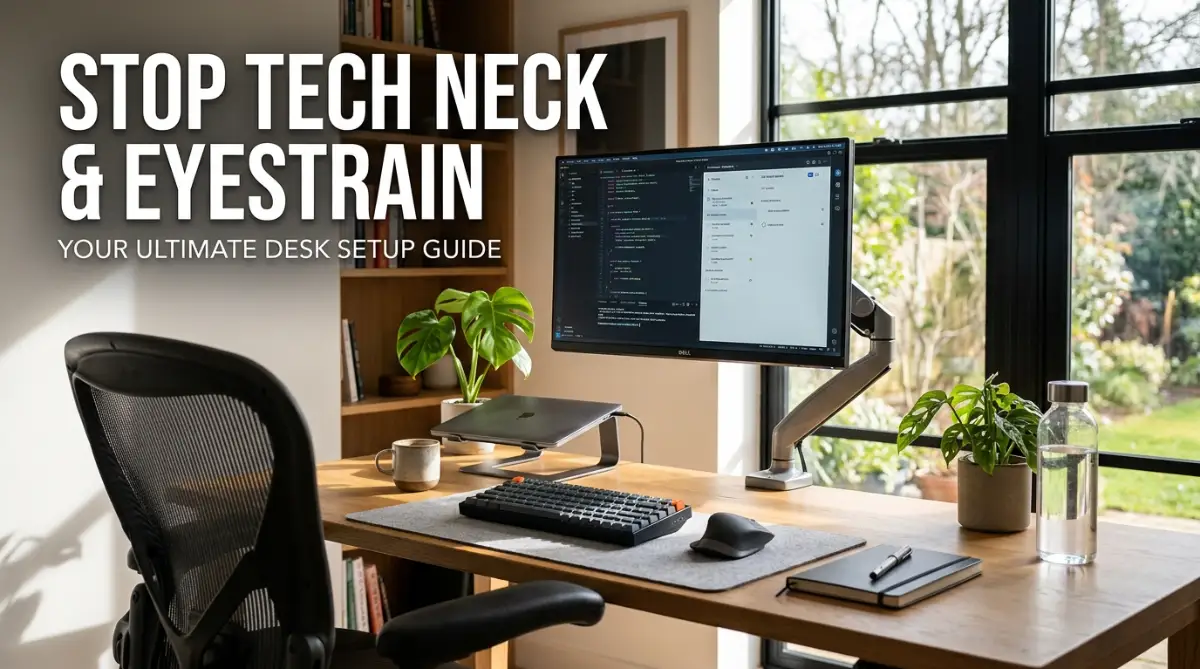
The position of your monitor dictates exactly what the rest of your body will do. If your screen is wrong, your posture will automatically be wrong, no matter how great your chair is.
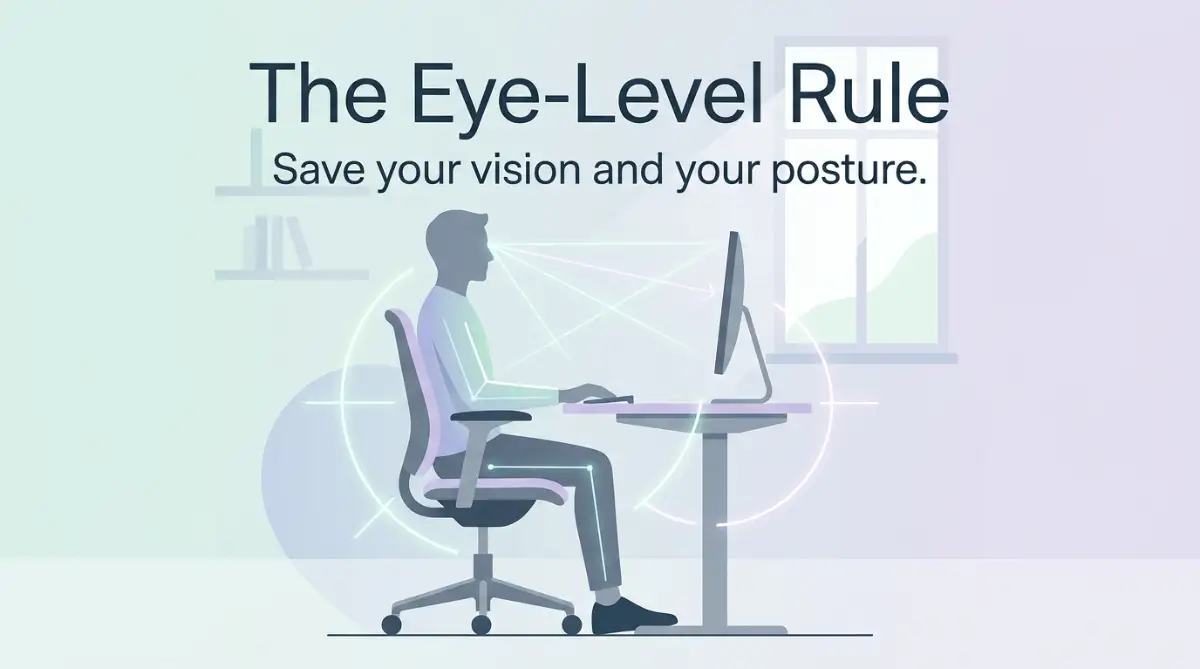
Your eyes naturally want to look straight ahead or slightly downward. Therefore, the very top edge of your monitor screen should be exactly at your eye level.
When you look straight ahead, you should be reading the URL bar of your web browser without tilting your chin up or down. If the monitor is too high, you will tilt your head back, which compresses the nerves in your neck. If it is too low, you will naturally slump forward and trigger tech neck.
This simple monitor height adjustment is the absolute most important change you can make today.
[Watch exactly how to measure the perfect distance and height for your screen so you never have to guess again.]
The Arm's Length Rule for Distance
Getting the height right is only half the battle; the distance from your face matters just as much for preventing eyestrain. If your screen is too far away, you will subconsciously lean forward to read small text, instantly ruining your posture.
To find the perfect distance, sit back comfortably in your chair and reach your arm straight out in front of you. Your fingertips should just barely touch the screen of your monitor.
If you are using two monitors, place them in a slight V-shape so they curve around your natural field of vision. This stops you from constantly twisting your neck back and forth all day.
My biggest personal mistake was spending a small fortune on a highly-rated ergonomic office chair, expecting it to magically cure my neck pain. But my pain never went away because my laptop was still sitting flat on my desk, forcing me to look down for eight hours a day. Once I finally bought a cheap laptop stand and a separate keyboard to lift the screen to eye level, my daily headaches disappeared almost completely.
Conquering Digital Eyestrain and Glare
Tech neck and eyestrain are heavily connected because visual discomfort naturally ruins your physical posture. When your eyes are tired or straining to see through glare, you lean closer to the screen without even realizing it.
Digital screens emit bright light that forces our eyes to work overtime, especially when the surrounding room is dark. Furthermore, we tend to blink significantly less when staring at digital content.
Normally, humans blink about 15 to 20 times a minute, which keeps our eyes perfectly lubricated and comfortable. But when we stare at a computer screen, that blink rate drops by half, causing severe dryness and that terrible sandy feeling.
The 20-20-20 Vision Habit
You do not need expensive blue light glasses to start protecting your eyes right now. The absolute best method for reducing eye fatigue is a simple habit called the 20-20-20 rule.
Every 20 minutes, look away from your screen and focus on an object that is at least 20 feet away. Hold your focus on that distant object for a full 20 seconds.
This short break completely relaxes the tiny focusing muscles inside your eyes. It acts like a quick reset button for your visual system, keeping them fresh throughout a long workday.
Mastering Your Room Lighting
Lighting is the silent killer of eye comfort, yet most people completely ignore it when setting up their home office. Having a bright window directly behind your monitor creates intense contrast that heavily strains your vision.
Conversely, having a window directly behind your chair will cast a massive, annoying glare right onto your screen. The best desk placement is actually perpendicular to your windows, allowing natural light to flow across your workspace sideways.
Adding a small strip of LED lights directly behind your monitor can work wonders for your eyes. This technique, called bias lighting, reduces the harsh contrast between your bright screen and the dark wall behind it.
The Keyboard and Mouse Trap
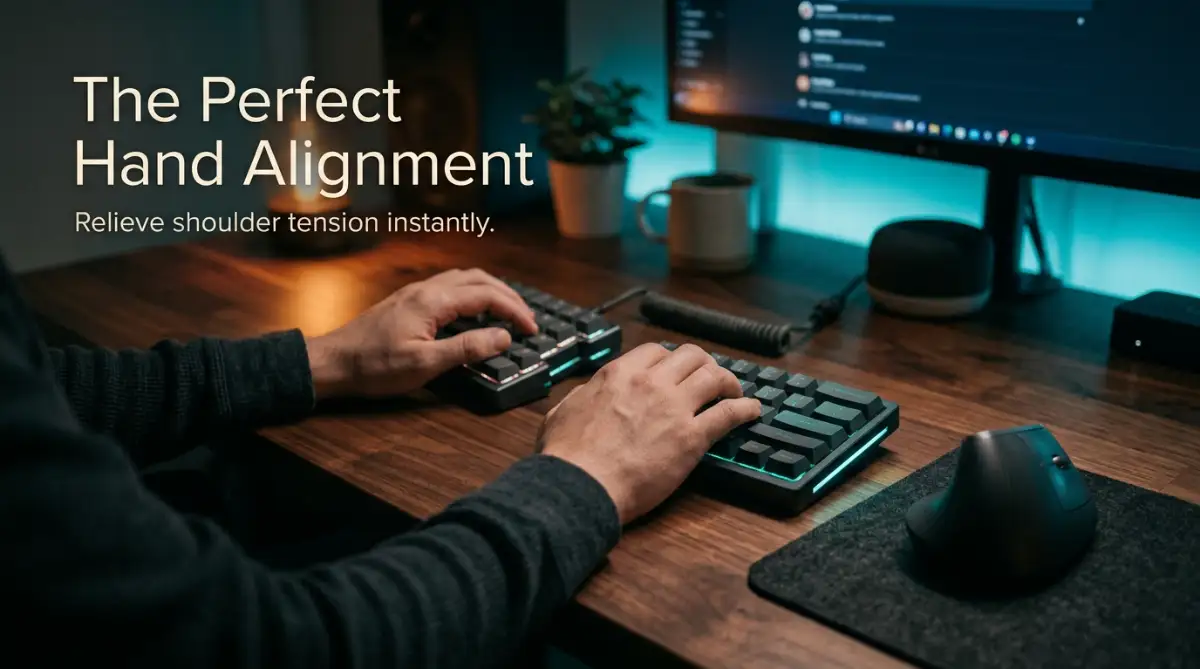
While the neck and eyes get most of the attention, your shoulders and wrists are quietly absorbing a massive amount of physical abuse. Reaching too far forward for your keyboard and mouse forces your shoulder blades to stretch apart unnaturally.
This constant forward reach locks your upper back muscles into a state of permanent tension. Your elbows should naturally rest closely against your ribs while you type.
When your hands are placed on the keyboard, your elbows should form an open angle between 90 and 110 degrees. Your wrists should float perfectly straight, never bending sharply upward or downward to reach the keys.
The Flat Desk Danger
Many standard desks are actually built way too high for comfortable typing, forcing you to shrug your shoulders up to your ears. If you find yourself lifting your shoulders just to type, you are actively building painful knots in your upper back.
To fix this, either raise your chair height and use a solid footrest, or install an adjustable keyboard tray under your desk. The goal is to keep your shoulders completely dropped and relaxed while your fingers do the work.
If you use a traditional computer mouse, pay close attention to where it lives on your desk. Placing the mouse too far away from the keyboard forces your right arm into an awkward, extended outward position. Keep your mouse as close to the side of your keyboard as physically possible to keep your arm safely tucked in.
The Reality of Movement and Circulation
Even if you build the most scientifically perfect ergonomic desk setup in the world, staying frozen in one position will still cause pain. The human body is a machine designed for constant, dynamic movement, not for static sitting.
Your spinal discs actually depend on movement to soak up nutrients and stay healthy and hydrated. When you sit completely still for hours, those discs compress and lose their natural elasticity.
This is why changing your physical position throughout the day is just as important as your chair adjustments. You should aim to stand up, stretch your arms, and walk around for at least two minutes every single hour.
These micro-breaks prevent blood from pooling in your legs and stop your muscles from stiffening into painful knots. A good ergonomic desk setup simply gives you a healthy home base to return to after you move around.
Hydration as a Posture Hack
It might sound completely unrelated, but drinking plenty of water is actually an incredible hack for better posture and less eyestrain. When your body is properly hydrated, your eyes naturally produce more high-quality tears to fight off dryness and glare.
Additionally, keeping a large glass of water on your desk forces you to regularly drink and, inevitably, use the bathroom. This creates a completely natural, built-in reminder to get out of your chair and move your body every few hours.
By combining the correct monitor height, relaxed shoulder positioning, soft lighting, and regular movement, you take total control over your physical health. You no longer have to accept daily headaches or burning eyes as a normal part of your digital life.
You can finish your workday feeling physically light, visually sharp, and mentally prepared to actually enjoy your evening. Taking a few minutes today to adjust your workstation will pay off with years of comfortable, pain-free productivity.
Leveling Up Your Workspace for Long-Term Comfort
You already know the basic rules of monitor height and chair support. However, to truly maintain a pain-free body over the long haul, we need to look beyond the obvious adjustments.
Your workspace is a living environment that should adapt to your daily habits. Small, seemingly invisible tweaks can make a massive difference in how you feel by Friday afternoon.
Let's look at some advanced secrets that professional ergonomists use to keep office workers completely pain-free. These are the strategies you can implement when standard advice just is not cutting it anymore.
The Magic of Monitor Arms
Most standard monitor stands are extremely limited in their movement. They might let you tilt the screen slightly, but they rarely go high enough for a tall person.
This forces you to stack heavy books under your monitor, which looks messy and limits your desk space. Investing in an adjustable gas-spring monitor arm completely changes the game for your neck health.
With a simple push, you can float your screen exactly where your eyes need it to be. If you lean back to read a long document, you can easily pull the monitor a few inches closer to your face.
This dynamic flexibility is exactly what official computer workstation guidelines recommend for preventing chronic upper body stiffness. You never have to compromise your posture for the sake of your equipment again.
Grounding Your Feet for Hip Alignment
We talk so much about the neck and shoulders that we often completely forget about our feet. But your posture is actually built from the ground up, starting with how your feet rest on the floor.
If your feet are dangling or barely touching the carpet, the entire weight of your legs pulls directly on your lower back. This constant pulling tension travels right up your spine and eventually settles in your neck.
Many people spend a fortune on office furniture, only to wonder why your ergonomic chair is still causing lower back pain despite all the adjustments. The missing puzzle piece is almost always a solid, angled footrest under your desk.
When you firmly plant your feet on a raised surface, you push your hips securely into the back of your chair. This takes the pressure off your lower spine and instantly makes your upper back feel lighter.
Screen Hygiene and Visual Clarity
Here is a strange but incredibly common reason for sudden eyestrain: a dirty monitor. Over time, screens collect a thick layer of microscopic dust, finger smudges, and environmental grime.
This hidden layer of dirt diffuses the light coming from your screen, making text look slightly blurry and out of focus. Without even realizing it, you will begin squinting and leaning forward to read perfectly clear emails.
Keeping your display spotless is an effortless way to keep your posture aligned. You should regularly take a few minutes to clean OLED screens safely with a gentle microfiber cloth.
Think of it like driving a car with a dirty windshield directly into the sun. Wiping away the grime instantly stops the squinting and helps your eyes relax naturally.
Managing Desk Temperature
Physical comfort is deeply connected to the temperature of your immediate working environment. If your hands are constantly resting near an incredibly hot laptop exhaust, you will unconsciously pull your arms away.
This awkward reaching habit slowly twists your shoulder blades out of alignment. Finding smart ways to cool down your overheating laptop not only saves your hardware but also keeps your hands comfortably positioned.
When your equipment runs quietly and coolly, your body stays relaxed. You stop tensing your muscles against uncomfortable heat or loud fan noises.
Hidden Setup Disasters Silently Ruining Your Body
Even with the best intentions, it is incredibly easy to fall into terrible physical habits when we get busy. We tell ourselves that we will just answer one quick email from the sofa, and suddenly three hours have passed.
These tiny, accidental mistakes compound over time, silently destroying the natural curve of your spine. Let me walk you through the most dangerous pitfalls I see people making every single day, so you can avoid this unnecessary suffering.
The Soft Sofa Trap
Working from a soft couch or a bed feels like the ultimate luxury of remote work. However, from a biomechanical standpoint, it is an absolute disaster for your spinal health.
When you sink into a soft cushion, your pelvis naturally tilts backward. This completely erases the healthy curve in your lower back, forcing your spine into a terrible "C" shape.
To look at your laptop screen on your lap, you have to aggressively bend your neck downward. This extreme bending creates severe forward head posture mechanics, pulling heavily on the base of your skull.
Doing this repeatedly will lead to sharp, burning pain in your shoulders and sudden, unexplainable tension headaches. No matter how cozy the sofa looks, keep your serious typing sessions strictly at a proper desk.
Ignoring the Evening Lighting Shift
Our eyes are not designed to stare at incredibly bright, artificial light boxes when the sun goes down. Working late into the evening with your monitor brightness set at 100% is extremely punishing for your vision.
As the room gets darker, the extreme contrast of the screen forces your pupils to work twice as hard to focus. This leads directly to red, dry, and painfully itchy eyes before you even close your laptop.
Beyond just physical pain, understanding how screen blue light secretly ruins your sleep is essential for your recovery. When your brain is tricked into thinking it is daytime, you cannot achieve deep, restorative rest.
You wake up the next morning with your neck muscles still tight and exhausted from the day before. You will finally realize why 8 hours of sleep leaves you exhausted when your body never truly relaxed during the night. Always turn down your screen brightness and use warm color filters after sunset.
The Armrest Dependency Danger
Many premium chairs feature massive, heavily padded armrests that look incredibly comfortable in photos. Because they are there, we naturally want to lean our full upper body weight onto them while we type.
But if those armrests are positioned even slightly too high, they push your shoulders right up toward your ears. You end up sitting like a frightened turtle for eight hours a day.
This constant shrugging motion creates brutal muscle knots right where your neck meets your shoulders. Medical professionals constantly warn about preventing computer vision syndrome and neck strain by letting your arms hang loosely.
Your armrests should lightly support your elbows only when you are resting, not while you are actively typing. If they get in the way of your desk, do not be afraid to completely remove them from your chair with a screwdriver.
The "Pushing Through the Pain" Mentality
Perhaps the biggest mistake I ever made was treating my physical pain as a sign of hard work. I used to think that stopping my workflow to stretch was a complete waste of productive time.
I would feel my shoulders tightening up and simply push through the burning sensation with another cup of coffee. This stubborn mentality guarantees that a minor muscle ache will evolve into a chronic injury.
When you ignore your body’s warning signals, the inflammation inside your joints gets progressively worse. Chronic physical stress raises your cortisol levels, making you easily irritable and emotionally exhausted.
Interestingly, taking frequent breaks and learning to lower high blood pressure naturally often starts with respecting your physical limits at work. Listen to your body; when your neck feels tight, step away from the keyboard immediately.
Incorrect Mouse Grip and Positioning
Your mouse hand does thousands of tiny, repetitive micro-movements every single hour. Gripping your mouse with a tense, claw-like hand restricts blood flow and inflames the tendons in your wrist.
Many people mistakenly plant their wrist firmly on the edge of the desk and only move their fingers. This terrible habit forces the delicate joints in your hand to absorb all the friction of moving the cursor.
Proper typing posture biomechanics suggest that you should move your mouse from your elbow, keeping your wrist perfectly straight. Using a vertical ergonomic mouse naturally rotates your forearm into a comfortable, neutral "handshake" position.
Your Master Action Plan for a Pain-Free Tomorrow
You do not need to throw away all your current furniture and start over from scratch to find relief. Healing your body starts with making tiny, intentional adjustments to the tools you already have right in front of you.
Start your very next workday by simply raising your monitor so you no longer have to tilt your head downward. Next, roll up a small towel and place it behind your lower back for instant lumbar support.
Commit to the 20-20-20 rule for your vision, and set a small timer on your phone to remind you to stand up. These small habits take zero extra time, but they completely protect your joints from early wear and tear.
Your physical health dictates the quality of your entire professional and personal life. Protecting your spine and your eyes today ensures you can keep doing the work you love without a heavy physical burden.
I know exactly how overwhelming and frustrating it feels to work while your body is constantly screaming in pain. My life completely changed the day I stopped blaming my age and finally took control of my desk setup. I promise you, taking just ten minutes today to align your workspace will give you back years of happy, relaxed, and pain-free evenings.
Burning Questions About Desk Comfort Answered
Do standing desks completely fix tech neck and bad posture?
Standing desks are wonderful for changing your body position, but they do not automatically fix poor posture. If your monitor is too low while you stand, you will still slouch your shoulders and strain your neck. You must adjust your screen height perfectly whether you are sitting down or standing up.
Are curved monitors actually better for preventing eyestrain?
Yes, curved monitors are excellent for eye comfort, especially if you use a very large screen. The gentle curve keeps the edges of the display at the exact same focal distance as the center. This stops your eye muscles from constantly refocusing as you scan across the screen, greatly reducing daily visual fatigue.
How long does it realistically take to correct tech neck pain?
If you fix your desk setup today, you will likely notice a massive reduction in sharp pain within just a few days. However, completely retraining your stretched neck muscles to hold their natural curve can take a few weeks of consistent good habits. Stretching daily and maintaining your new ergonomic setup will steadily melt that tension away over time.
Can a cheap office chair still be good for my back?
Absolutely! The price tag of the chair matters much less than how well you adjust it to fit your specific body shape. By adding an inexpensive lumbar pillow and using a small box as a footrest, you can easily transform a cheap chair into an ergonomic powerhouse.
Should I wear blue light blocking glasses during the day?
Blue light glasses are helpful, but they are not a magical cure for all digital eyestrain. The best daytime defense is actually fixing your room lighting to reduce glare and taking frequent breaks to blink normally. Save your blue light glasses primarily for late evening work to help protect your sleep cycle.
Disclaimer: The information provided in this blog post is for educational and informational purposes only and does not constitute medical advice. If you are experiencing severe, chronic pain or vision issues, please consult with a qualified healthcare professional or a certified physical therapist for a personalized medical evaluation.